You are probably underselling your labor.
Every person you employ costs more than their wage. Add payroll taxes, workers' comp, the vehicle, the phone, and the true cost runs far above what you pay them. Charge below it and you lose the difference on every hour you bill. The Labor Burden Tracker finds your real number, to the cent, and tells you what to charge.
Runs in your browser. No login. Your numbers stay yours.
Labor is the easiest cost to undersell.
Most builders price off the wage. But the wage is the smallest part of what an employee actually costs, and everything stacked on top stays invisible until you go looking for it. Charge off the wage alone and you give away margin on every hour you bill.
The gap does not show up on the invoice. It shows up on the bottom line.
$10,000 a year
Undercharge one full-time employee by just $5 an hour and that is what you hand back. Multiply it across your whole payroll.
Locked in for the job
Set the rate too low in a fixed-price contract and you carry that mistake to the final day. It cannot be repriced once it is signed.
You lose on your best
Average your rates and you lose money on your highest-paid, most productive people, because the hours never land where you estimated.
Hidden in overhead
The vehicle, the phone, the workers' comp: forget them and they come out of your profit instead of the client's invoice.
Found at year end
You see it in the financials, when the work is already done and billed and there is nothing left to change.
They know their number
Your competitor is not cheaper than you. They priced it right. You are guessing, and guessing low.
A $34 wage is not a $34 cost.
There are the costs you expect: the payroll tax match, workers' comp, retirement, vacation and holiday pay. Then there are the ones most CPAs file under overhead and most builders forget: the vehicle, the fuel, the phone, training and safety, tools and gear. Every one is tied to that employee, which makes every one a job cost.
Stack them and the picture changes. Charge for the picture and you stop losing money on your own people.
A worksheet you will actually keep current.
It replaces the spreadsheet you built once and never reopened. Every person, fully burdened, with the charge-out rate and the profit per hour sitting right next to the wage.
Burden to the cent
Wage in, fully burdened cost out. Burden percent, charge-out rate, and profit per hour calculated for every person on the payroll.
The costs everyone forgets
Standard deductions plus the indirect ones: vehicle, fuel, phone, training, safety, clothing, bonuses. The job costs that hide as overhead.
Salary or hourly
Handles both. Paid time off in days, not guesswork. Override any rate per person when someone does not fit the standard.
Raises and reviews
Wage history, raise tracking, and the next review date for every employee, so the conversation gets scheduled instead of pushed.
Billed vs not billed
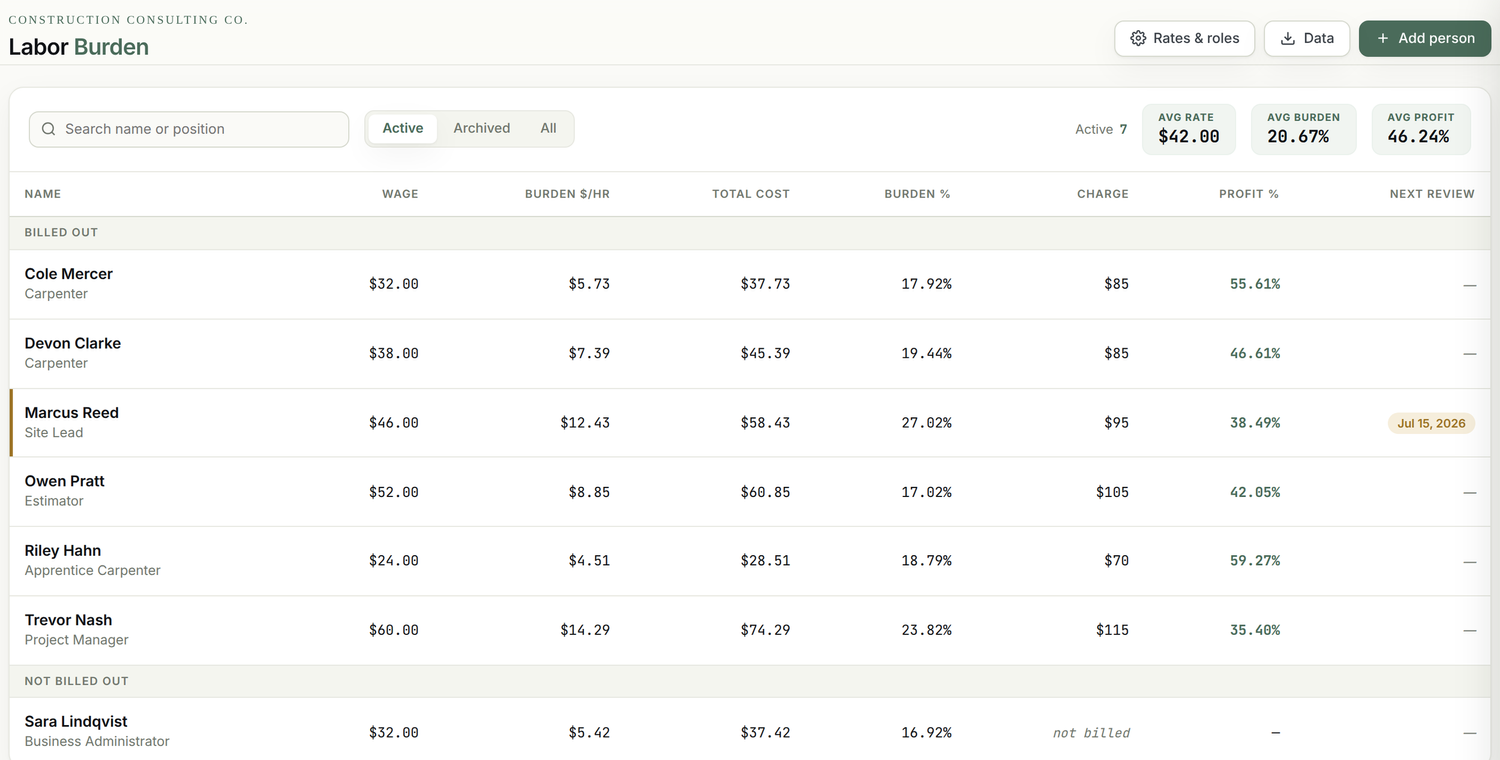
Group the people you charge out from the people you do not. See average rate, average burden, and average profit across the ones who bill.
One file, your data
Opens in any browser. No login, no account, no spreadsheet fragility. Your wages never leave your machine.
Stop guessing on the most expensive number you have.
The wage is the smallest part of what your team costs. Find the real number, to the cent, and charge for it.
Get the trackerIt knows your state.
It knows your province.
Pick your state or province and the statutory lines build themselves: the right wage bases, the right contributions, nothing that does not belong to you.
- Social Security, Medicare
- FUTA, SUTA at the Texas base
- Workers' comp
- State paid leave
- Social Security, Medicare
- Paid family & medical leave
- L&I per hour
- SUTA at the WA base
- CPP, EI, CPP2
- WorkSafeBC
- Employer Health Tax
- Vacation & stat
- CPP, EI, CPP2
- WCB Alberta
- Employer Health Tax
- Vacation & stat
- QPP, QPIP, QPP2
- EI at the Quebec rate
- CNESST, QHSF
- CPP / standard EI
- All 50 states plus DC
- All 13 provinces & territories
- Current wage bases built in
- Yours ready on pick
The spreadsheet was never built to hold this.
Most builders run this once in a spreadsheet, never check it again, and let it rot in a Drive folder nobody opens. One wrong cell quietly skews every rate. The tracker locks the math, keeps the history, and is built to open and use.
- One wrong cell skews every rate, and you never notice.
- No history when a wage or a tax rate changes.
- Formulas break the moment you copy a row.
- It ends up buried in a Drive folder nobody opens.
- The math is locked and right every time.
- Raise and review history on every person.
- Change one rate and everything recalculates.
- One file you actually open, by state and province.
Your whole team on one screen
Every person, grouped by who you bill out, with their true cost, charge-out rate, burden, and profit sitting side by side, and your blended averages on top. The number you bill is no longer a guess.
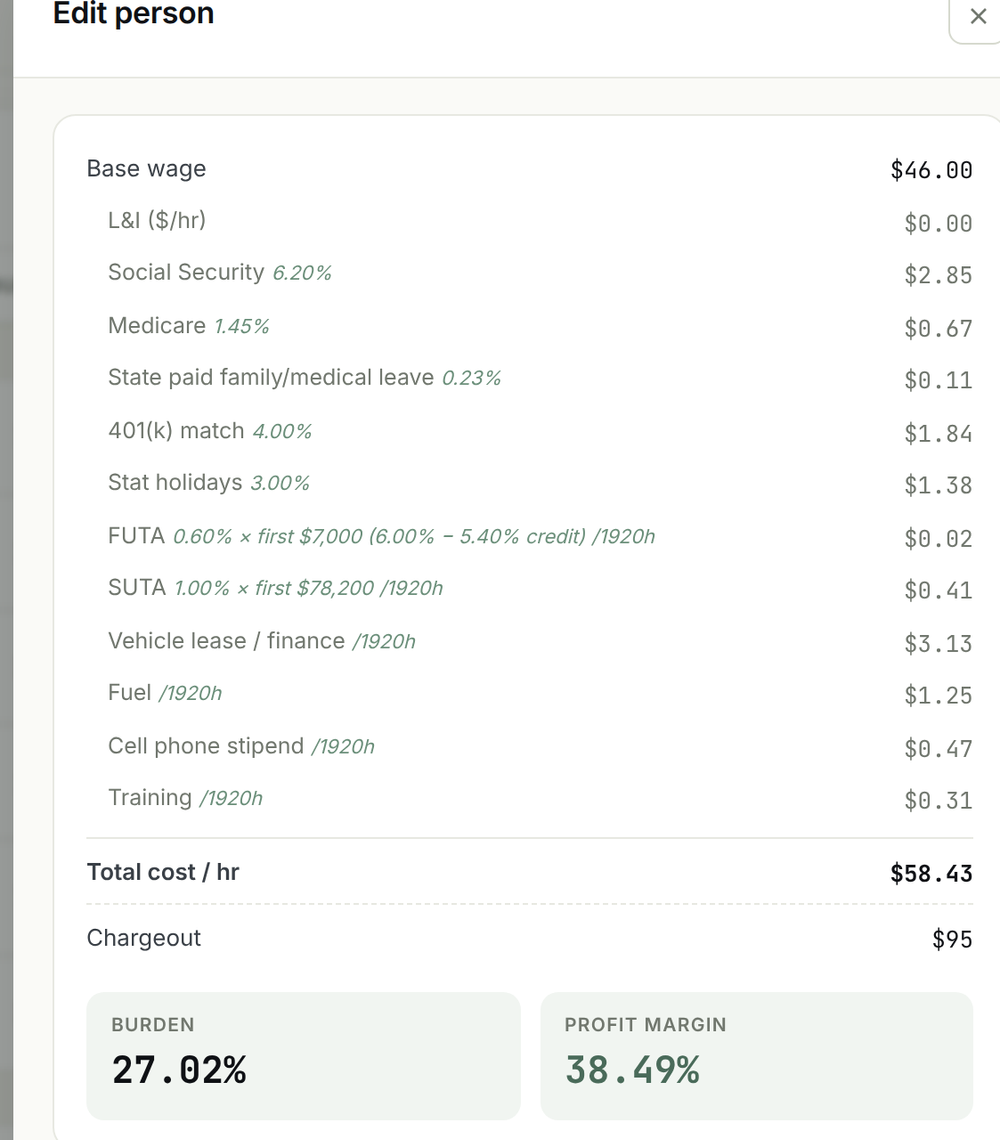
The burden builds itself
Open any person and the statutory lines load for your state. You add the company costs, the truck, the fuel, the phone, the gear, and every flat dollar gets spread across the hours that person actually works. The real cost of an hour, to the cent.
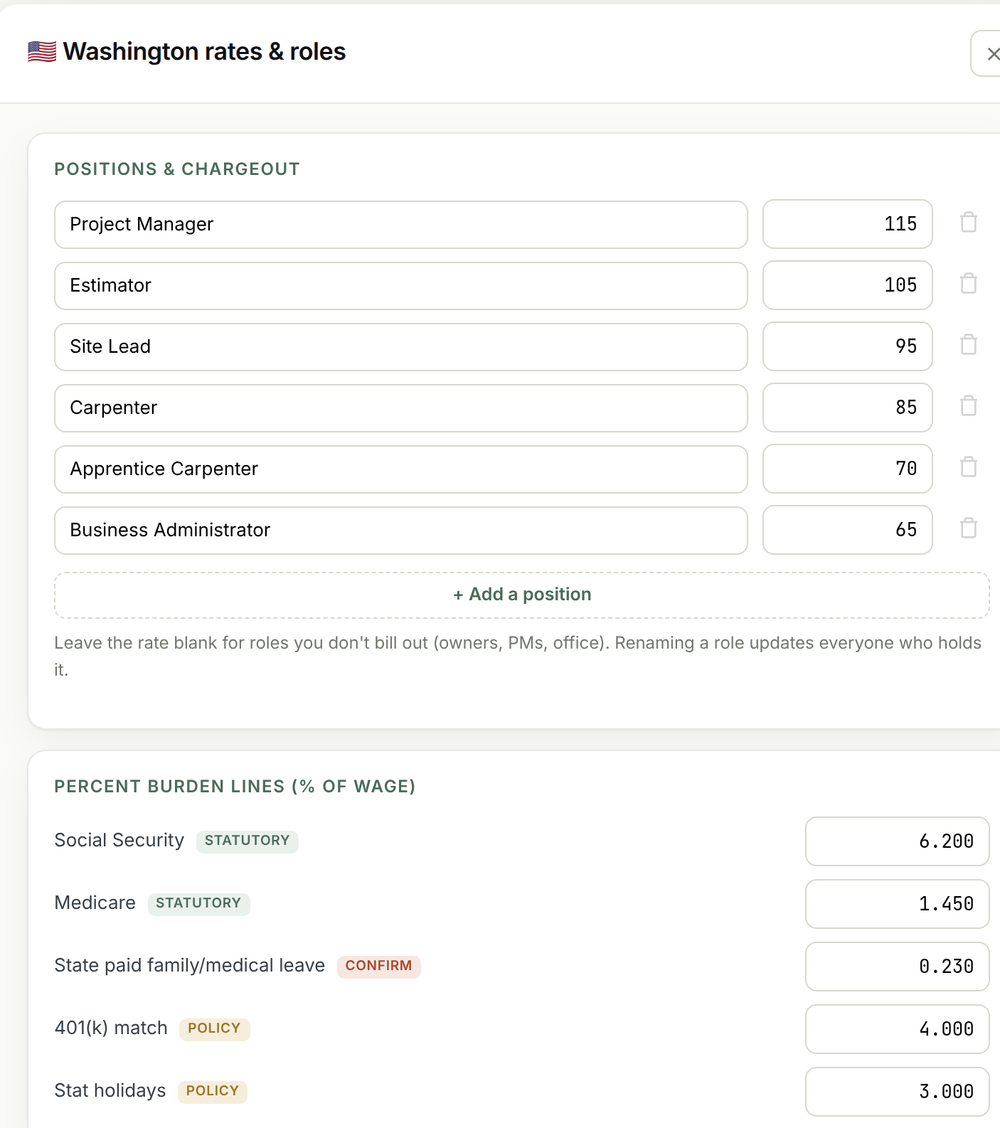
Price every role, by state
Set a charge-out rate per role, and leave it blank for the people you do not bill out. The statutory burden for your state is built in, and every rate stays editable, so when something changes you change one field.
Knowing the cost is half the job. The other half is the markup.
The tool gives you the fully burdened number. Here is the rule it is built around.
Margin on Labor
A 50 percent markup on the burdened cost is a 33 percent margin on the charge-out rate. That is the floor on every hour you put on the job.
Never Charge Below Your Highest-Paid Person
Averaging rates feels efficient and quietly loses money, because the hours are never exactly right. Price to the highest-paid person and you stay safe on every job.
Cost-Plus or Fixed Price
Cost-plus builds the charge-out rate and still marks up the job. Fixed price turns the burdened cost into a standard estimating rate. The tool supports the way you actually bid.
 Bryan Kaplan · 21 years in the field
Built by a builder. Not a tech company.
Hi, I'm Bryan Kaplan.
I help remodelers, contractors, and custom home builders improve their business and their bottom-line profitability. Whether you are just getting started or ready to scale, I can help.
I spent over 21 years in residential construction as a carpenter, remodeler, custom home builder, and business owner. I left the client side in 2018 on a mission to help construction business owners get the training, systems, and processes in place to thrive.
Today I build tools specifically for builders. This tracker is one of them, drawn from the same worksheet I have walked hundreds of owners through. Your team is not a burden. The cost of employing them is real, and it is yours to charge for.
One tool. Every person. The right rate.
- The full Labor Burden Tracker
- US and Canada, every state and province
- Salary and hourly, with per-person overrides
- Raise and review tracking built in
- Runs offline in any browser, no login
- Fills in like a simple form, no spreadsheet skills
SECURE CHECKOUT · INSTANT DOWNLOAD
Before you buy.
Does it work for the US and Canada?+
Both. Pick your country, then your state or province. The tool loads the correct statutory lines for that jurisdiction: Social Security, Medicare, FUTA and SUTA for the US, CPP, EI and the provincial pieces for Canada, including Quebec's separate QPP and QPIP setup. You only see what applies to you.
Cost-plus or fixed price?+
Either. Cost-plus builders enter their charge-out rates and watch the profit per hour. Fixed-price builders use the fully burdened cost to set standard estimating rates. The math holds up both ways.
Where does my data live?+
In your browser, on your machine. There is no account and no server. Your wages and rates never leave your computer. Save a copy any time to back it up or hand it to your bookkeeper.
What happens when tax rates change?+
You update the number, and that is the point. Every rate in the tool is editable, so when a contribution rate, a wage base, or your workers' comp changes, you change that one field and everything recalculates. It ships current, and it stays current because you control it. No new version to buy, no subscription to wait on.
Do I need a subscription or a login?+
No. It is a single file that opens in any browser, online or offline. No password, no monthly fee, no software to install.
I am not a spreadsheet person. Is it complicated?+
No spreadsheet skills needed. You fill in a simple form, you do not build one. Add each person and their costs, and the tool works out the burden, charge-out, and profit for you. There are no formulas to write and nothing to wire up.
Stop underselling your labor.
Fill it in once. See where every hour stands. Then charge what the work is actually worth.
Get the Labor Burden Tracker